



- Jobscan is the primary tool you need to actually land interviews. While Kickresume is a helpful “starter” for creative templates, it lacks the technical precision required to work with modern hiring software.
-
The Winner for Strategy: Jobscan is the essential “closer.” It reverse-engineers specific ATS logic (like Taleo and Greenhouse) to boost the chances that your resume reaches a human.
-
The Technical Edge: A “pretty” Kickresume layout can often get scrambled by recruiters’ software. Jobscan provides 100% ATS templates that the ATS systems can parse.
-
The Search Advantage: Jobscan offers superior LinkedIn Optimization to help recruiters find you passively; Kickresume focuses on personal websites which don’t help your passive job search.
-
The Pro Verdict: Never submit an application without running it through Jobscan first. Jobscan is the only tool that guarantees your resume is optimized for the specific job description.
Your resume has two audiences in this competitive job market: the human recruiter and the Applicant Tracking System (ATS). The “Black Hole” of job applications—where resumes are submitted but never heard from again—is usually caused by a failure to please the latter.
Two players have emerged to solve this: Jobscan vs. Kickresume. But while they might look similar on the surface, they serve two very different stages of your job search. One is a creative architect; the other is a precision engineer.
What is the difference between Jobscan and Kickresume?
The fundamental difference lies in their primary goal. Kickresume is primarily an AI-powered content builder and basic scanner. It is designed to help job seekers create a beautiful, graphic design-rich resume from scratch using AI writing tools and stylish templates.
Jobscan, on the other hand, is an optimization engine. It doesn’t just want you to have a “nice” resume; it wants you to have the specific ATS resume that matches a job description. Jobscan uses a sophisticated algorithm to compare your resume against a specific job posting, giving you a Match Rate that help you quantify how likely you are to be shortlisted by a recruiter in the ATS.
Given that over 97% of Fortune 500 companies use an ATS in their hiring, knowing about the ATS and having an ATS-optimized resume is critical to landing an interview.
Here’s a breakdown of the key differences between Jobscan vs. Kickresume:
| Feature | Jobscan | Kickresume |
| Primary Goal | Post-creation ATS optimization | Resume building |
| AI Strength | Keyword & skill gap analysis | GPT-4 content generation |
| Design/Templates | Clean, minimalist, 100% ATS-safe | Highly visual, creative, design-heavy |
| Scoring System | Match Rate % (against job descriptions) | General “Resume Score” |
| Bonus Tools | LinkedIn & Cover Letter Optimization | Personal Website & Career Maps |
Read More: What Jobscan Match Rate Should I Aim For?
Does Jobscan help you optimize for applicant tracking systems (ATS)?
While a resume from Kickresume looks great to a human, it might still fail the “machine test.” This is where Jobscan becomes essential.
Jobscan’s core value is its reverse-engineered ATS logic. It doesn’t just guess what keywords you need; it analyzes the job description to find the specific hard skills, soft skills, and recruiter priorities you missed from the job requirements.
- The Match Rate: Jobscan provides a percentage score after you scan your resume. This resume checker score can help you quantify the strength of your resume through the eyes of a recruiter and hiring manager.
- Live Optimization (One-Click Optimize): As you add missing keywords to your resume within the Jobscan interface, your score updates in real-time.
- ATS Compatibility Check: Jobscan identifies if your file format, fonts, or layouts (including those from builders like Kickresume) will break when read by systems like Taleo, Lever, iCIMS, or Greenhouse.
- LinkedIn Optimization: The premium LinkedIn Optimization feature helps ensure your “passive” job search is running alongside your active one.
The resume scanner helps you create your best resume for a target job. The generated report helps you improve your work experience section, better communicate your areas of expertise, and match the job listing in a way that sounds natural and authentic.
Jobscan is the tool you use through every stage of your job search. From building your resume, optimizing your resume, and building your online presence, Jobscan is the all-in-one suite of resume tools for landing interviews.
Read More: How Recruiters Really Read Your Resume
How does Jobscan’s resume scanner work?
Optimizing your resume for the ATS—and your dream job—is easy with Jobscan’s tools. Get a comprehensive report with a Match Rate by scanning your resume against your target job description.
The resume scanner mimics the functionality of an ATS. If the resume scanner can’t parse your resume, then an ATS will struggle to properly extract key information for the recruiter to search in their database.
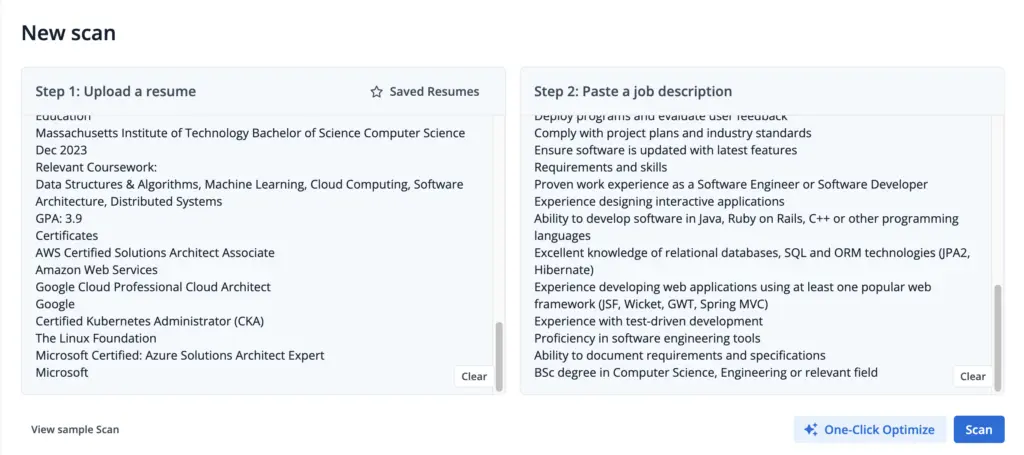
The scanner runs over 30 checks and the generated match report will offer insights and recruiter tips. You’ll get actionable steps to improve your resume, including adding missing hard and soft skills, removing jargon and cliches, and addressing formatting mistakes.
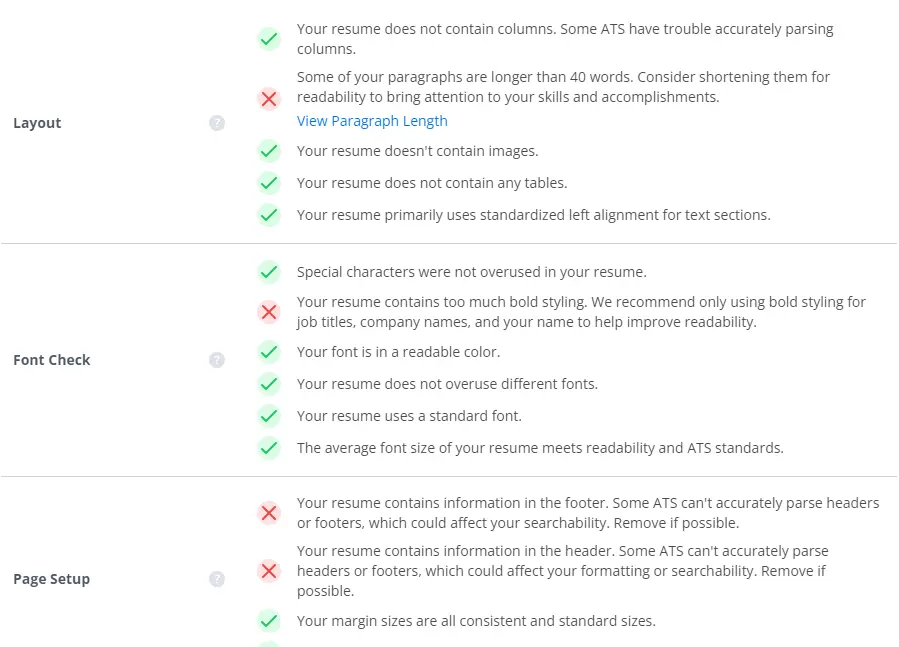
You can make the changes manually, then rescan your resume, or get AI resume assistance in One-Click Optimize to set yourself up for greater job search success in the application process.

What tool is best for resume building?
A seamless resume builder should make writing your resume from scratch or converting your resume to an ATS-friendly format much faster. Jobscan’s resume builder provides guidance as you build or rewrite your resume so you don’t miss any key information that can make or break your application.
Resume builders should help you successfully structure key sections:
- Resume headline and summary
- Work experience
- Skills
- Education
- Certifications
- Publications
- Awards
- Volunteer experience
- Projects
- Languages
- And more
You can choose from a range of professional, ATS-friendly resume templates that you can download as a PDF or Word document without limits.
Save your new document as a base resume by starring it.
It will be saved at the top of your resume scanner box on your Jobscan dashboard.
Once it’s starred, you can simply paste job descriptions and scan or move into One-Click Optimize without having to upload your resume for every scan.

What is the best AI resume tailoring tool?
When you want AI support to remove the barrier of manual optimization, One-Click Optimize helps you tailor your resume with a few clicks in as little as five minutes.
Paste in your job description in the resume scanner on your dashboard and click “One-Click Optimize.” You’ll be taken to a workspace that preserves your resume formatting, bypassing any forced templates.
Here’s what the dashboard looks like.
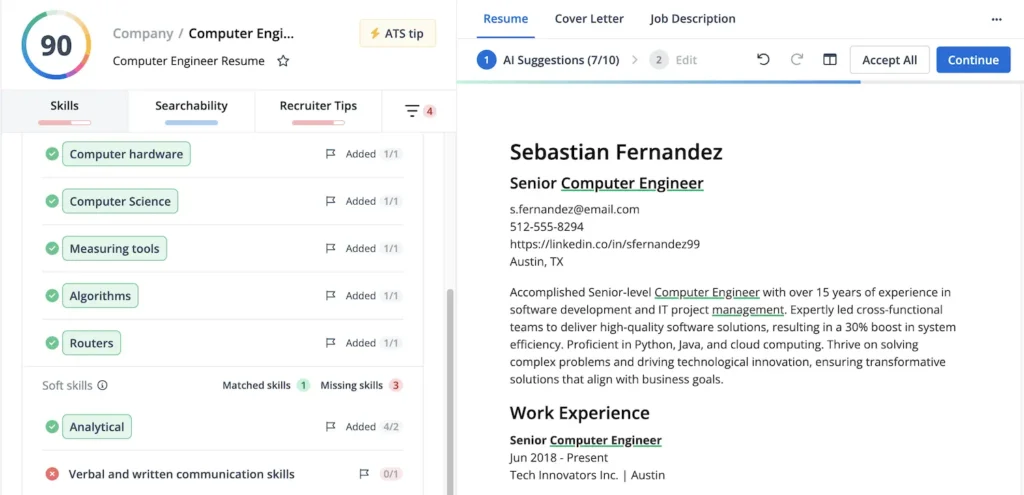
The keywords and skills from the job description will be in the lefthand panel, showing you which you’ve included and which you’re missing. The panel also lets you toggle to see other parameters from the match report.
Recommendations will appear in the righthand panel on your resume document. The AI will suggest removing words, rephrasing bullet points, and make recommendations on where to include missing skills.
With one click, you can accept or reject suggestions and see your Match Rate increase in real time as you optimize.
What AI tools help write a cover letter?
As you tailor you resume in One-Click Optimize, you can toggle the window to go to the cover letter tab to use the cover letter generator.
Here’s what that looks like:

You can choose to use AI to start your cover letter draft from scratch or upload an existing cover letter to edit. Make any changes directly in the generated output to personalize the hiring manager’s name, highlight specific accomplishments, or write a more customized call to action.
Once you’re happy with your document, you can download it as a PDF and attach it to your application.
Where can you find jobs relevant to your experience?
One of the most time consuming tasks in the job search is actually finding the most relevant jobs to your experience. Jobscan’s job match helps you narrow your focus to roles that are the best fit for you.
On your Jobscan dashboard, you can scroll to the job opportunities without ever leaving Jobscan. The board will display relevant, recent jobs that align closely with your resume and spotlight your top matches and other high match jobs.
What does that look like? Here’s a sample of what your job board may look like.
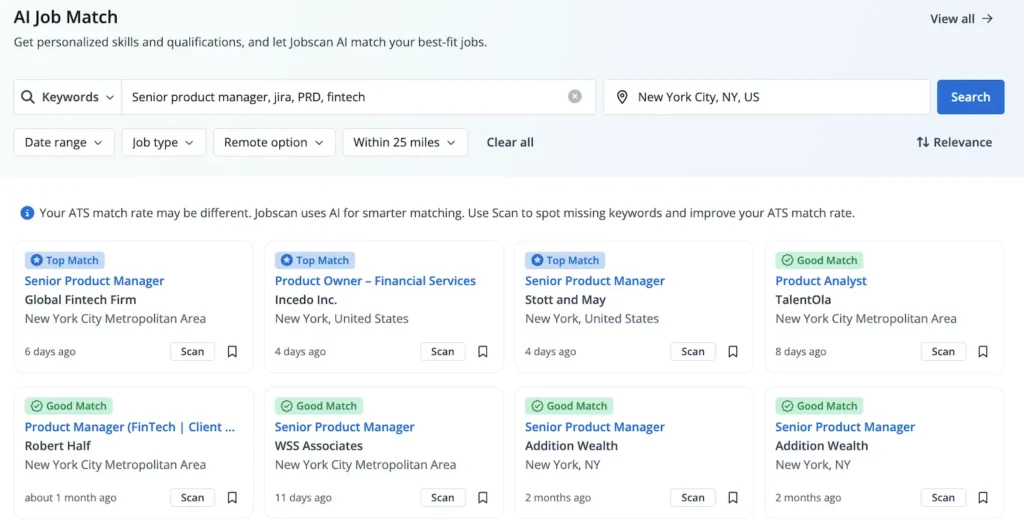
You can choose to filter based on your saved resume, or you can search by keywords, job title, and industry. Let your resume determine your location information or input manually to change your target city.
Once you select an opportunity, a side panel will open where you can choose to scan your resume to start optimizing or save the role to your job tracker board.
Here’s what that looks like.

What tool is better for LinkedIn profile optimization?
If your goal is to be found by recruiters via “passive” search, Jobscan is the clear winner here. Jobscan’s LinkedIn Optimization tool allows you to scan your profile against several job descriptions in your industry.
It tells you exactly which top keywords to add to your “Skills” section and how to rewrite your headline and bio section to rank higher in recruiter search results.
Kickresume focuses more on the resume-to-website pipeline, which is great for a portfolio but less effective for LinkedIn SEO.
Read More: Knockout Job Application Questions: How One Answer Can Kill Your Chances
Is Kickresume a good tool for resume scanning?
Kickresume’s resume scanner only runs 20 checks compared to Jobscan’s 30+. And the general ATS check doesn’t help you tailor your resume to the job you’re applying for. This is limiting, because you’ll have to either manually tailor your resume, or use another tool to optimize before you click “Apply.”
The resume templates Kickresume’s scanner doesn’t flag resume formatting mistakes for you, so it’s not the right tool for testing for ATS friendliness.
If you are staring at a blank page, Kickresume can be a starting point for resume creation. The templates it offers are visually appealing, but with their limited AI features and missing integration with their scanning tool, it may add extra friction to your process.
The resume scanner is a basic tool that can’t compare your resume to the job description.
When it comes to the templates, there’s a catch: Beautiful design elements can struggle with ATS parsers. Columns, graphics, tables, and images can get scrambled by an ATS parser.
Aesthetically pleasing, branded resumes with complex elements are better saved for warm connections and networking or resumes you’re sending in a direct email.
Content is more important than style, so focus on your accomplishments and skills first.
How do Jobscan and Kickresume compare on pricing in 2026?
Overall, Jobscan is a premium investment favored by mid-to-senior professionals who cannot afford to have their applications ignored.
Here’s a general overview of cost comparison for Jobscan vs. Kickresume:
| Feature | Jobscan | Kickresume |
| Free Tier | 5 Scans per month | Basic templates & limited AI |
| Monthly Price | ~$49.95 | ~$24.00 |
| Annual/Quarterly | ~$29.98/mo (billed quarterly) | ~$8.00/mo (billed annually) |
Can you use Kickresume and Jobscan together for better results?
You don’t have to stick to only one tool. You can implement a hybrid workflow. A combination gives you the best of both worlds: a resume that looks professional to people and performs perfectly for algorithms.
- Draft with Kickresume: Use their AI to generate your base content and choose a professional, clean layout.
- Optimize with Jobscan: Export your Kickresume PDF/Word doc resume and upload it to Jobscan alongside the job description. Convert your resume to an ATS-friendly format using the recommendations from the match report. Be sure to use a professional resume file name.
- Refine: Use Jobscan’s keyword suggestions to tweak the AI-generated text from Kickresume, ensuring it is perfectly tailored to that specific role. It can even detect plurals and verb tenses. But be sure to avoid keyword stuffing—only include skills you actually have.
To streamline your workflow, you can use Jobscan’s resume builder with professional templates and move directly into the resume scanner or One-Click Optimize. Save your newly built resume as a base resume to easily find it on your dashboard when you’re ready to tailor your resume to a specific job description.
Read More: Sick of Re-Entering Your Info After Uploading a Resume? Here’s Why Companies Do It
Final verdict: Should you choose Jobscan or Kickresume?
- Choose Kickresume if: You are starting from zero, you need a creative or modern design, and you want an affordable AI assistant to handle the resume writing for you.
- Choose Jobscan if: You already have a resume but aren’t getting interviews. If you are applying to mid-size or large companies that use ATS, Jobscan’s resume optimization is the most reliable way to guarantee your resume gets read.
Read More: Why Does the Jobscan Resume Scanner Say My Resume Is Missing Dates?
Discover Jobscan’s ATS Toolkit
Explore Jobscan’s real customer stories:
FAQs
Yes. While Kickresume provides a general Resume Score, it is not tailored to a specific job. Jobscan is the only tool that reverse-engineers the specific logic of major systems like Taleo, Greenhouse, and iCIMS. It gives you a Match Rate for every individual job you apply for, ensuring your resume actually reaches a human recruiter.
While Kickresume labels many of its templates as “ATS-friendly,” their more creative designs (multi-column layouts, graphics, and icons) can still be scrambled by older ATS software. Jobscan’s built-in resume builder focuses on clean, high-parsing structures that are guaranteed to pass every system, making it the safer choice for corporate and high-volume applications.
Kickresume is generally more budget-friendly, especially for students, with annual plans starting around $8/month. However, Jobscan is viewed as a high-ROI investment. Because Jobscan helps you land interviews faster by optimizing for the algorithm, many users find that the premium cost pays for itself by shortening the total time spent unemployed.
Jobscan is the clear leader for LinkedIn. While Kickresume focuses on building personal portfolio websites, Jobscan’s LinkedIn Optimization tool helps you appear in more recruiter searches by identifying the specific industry keywords your profile is currently missing.