



-
Use a clean, single-column format. Avoid multi-column layouts, tables, and text boxes, as the ATS can scramble the information.
-
Stick to universally recognized, web-safe fonts like Arial, Calibri, Garamond, Georgia, or Times New Roman.
-
Use a font size between 10 and 12 points for the body text and 14-16 points for headings.
-
Don’t put critical information (like your name, email, or phone number) in the document’s header or footer.
-
Use clear, traditional titles for each section.
-
Use standard solid or open circles or squares. Avoid custom symbols, checkmarks, or arrows.
-
Unless the job posting specifies a specific file format, submit your resume as a .docx file or a text-based PDF (with a professional file name).
Technology is changing the way we do everything, and that includes applying for jobs.
You can have the most strategically written content in the world, but if your file’s underlying architecture is flawed, the software will simply erase you. Building an ATS friendly resume is a strict exercise in technical compliance.
This guide covers the exact document anatomy—from optical character recognition (OCR) approved file types to precise margin spacing and web-safe fonts—required to ensure a parser extracts your data flawlessly.
How do ATS software read your resume?
For job seekers navigating the modern hiring landscape, understanding the “robot eyes” of recruitment is essential.
When you submit your resume to a job posting, the ATS parses the document and turns your document into searchable data for the recruiter. Once the hiring teams move onto the resume review stage, they’ll start searching their database for candidates.
Text extraction pulls that information out of your file and organizes it into an ATS database.
- Parsing: The system identifies segments of your resume (e.g., “Work Experience,” “Education,” “Skills”).
- Categorization: It sorts your data into specific fields. For example, it recognizes “January 2018-April 2022” as a date range and “Software Engineer” as a job title.
- Indexing: Your information is stored so that recruiters can search for specific criteria.
Your resume is a data entry in an ATS, so the primary goal for an ATS-friendly resume is clarity and simplicity.
An ATS-friendly resume needs to be readable by the machine so it can extract the data properly. And when you write an ATS resume, it needs to be rich in keywords to enable recruiters to find you more easily.
The 5-point ATS-friendly visual inspection checklist
What is the anatomy of an ATS-friendly resume and what makes a resume readable by software?
Here are 5 parameters to check off to make your resume ATS-compliant.
1. Approved file types (PDF vs. Word)
A text-based PDF or Word document are the most ATS-friendly file types. If a job description doesn’t specify a preferred type on submission, you’re safe to choose either option.
Other file types won’t parse correctly (or worst case scenario, it won’t parse at all).
Just remember to choose a professional file name.
2. Web-safe fonts and sizing
Decorative and elaborate fonts can seem like a creative touch. But overly intricate fonts or too many fonts can be messy and unclear to the ATS. Choosing web-safe fonts—typefaces that come pre-installed in operating systems—are the best resume fonts for ATS-friendliness.
- Calibri
- Cambria
- Georgia
- Arial
- Helvetica
- Times New Roman
- Garamond
- Tahoma
- Verdana
Use a font size between 10 and 12 points for the body text and 14–16 points for headings.
Standard fonts may not be the most aesthetically pleasing, but they’re readable by the ATS, which is exactly what you need to land an interview.
3. Standardized margins and spacing
Keep your document’s margins content-free and follow a few simple best practices
Your resume margins should be set at a standard one inch on all sides, although reducing the margin to a maximum of 0.5 inches won’t impact ATS readability. Avoid narrowing the margins further, since the document will begin to look crowded. Some white space is good for the human reader, too.
When you run your resume through the resume scanner, it will verify elements on this checklist for ATS-friendliness, like the page setup.
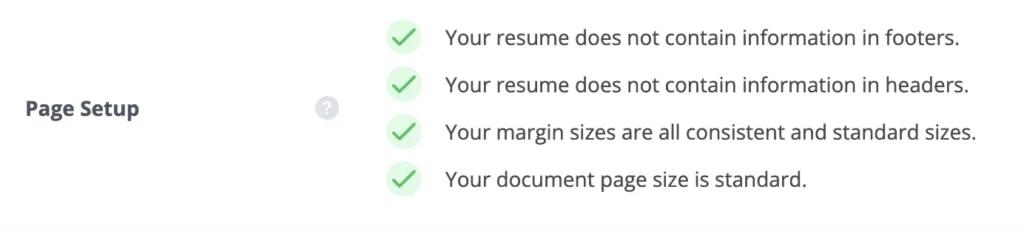
You don’t have to adjust the margins for the sole purpose of keeping your resume to one page. A two-page resume is just fine for ATS-friendliness.
4. Machine-readable bullet points
ATS-friendly bullet points have keyword-driven content to capture ATS searches. But for the ATS to read the bullets successfully, they also have to be a standard design.
Stick to circle bullet points or dashes for ATS-friendliness. You can use standard solid or open circles or squares, too. But avoid custom symbols, checkmarks, or arrows.
5. Standard section headers
Standard headings are critical for an ATS resume. When the ATS parses your resume and extracts text, headings contextualize what its reading. Custom headings are nonsensical to the ATS because its looking for patterns, so stick to organized headings like:
- Work Experience
- Education
- Skills

The elements that instantly break parsers
An ATS-friendly resume also requires you to remove certain elements to comply with the software.
Elements to avoid to maximize your resume’s ATS-friendliness:
- Content in headers and footers
- Graphics
- Tables and columns
- Grids
- Symbols
Learn more about ATS tables and columns and what to use instead.
How to test your formatting before applying
Luckily, you can double check your document and confirm you hit all 5 points on the checklist with Jobscan’s resume scanner.
It mimics the functionality of an ATS, so the generated report will identify what does and doesn’t comply with an ATS parser.
This example report shows how the resume scanner assessed the anatomy of the resume and made recommendations for factors in the checklist: resume styling, margins, font checks, and more.
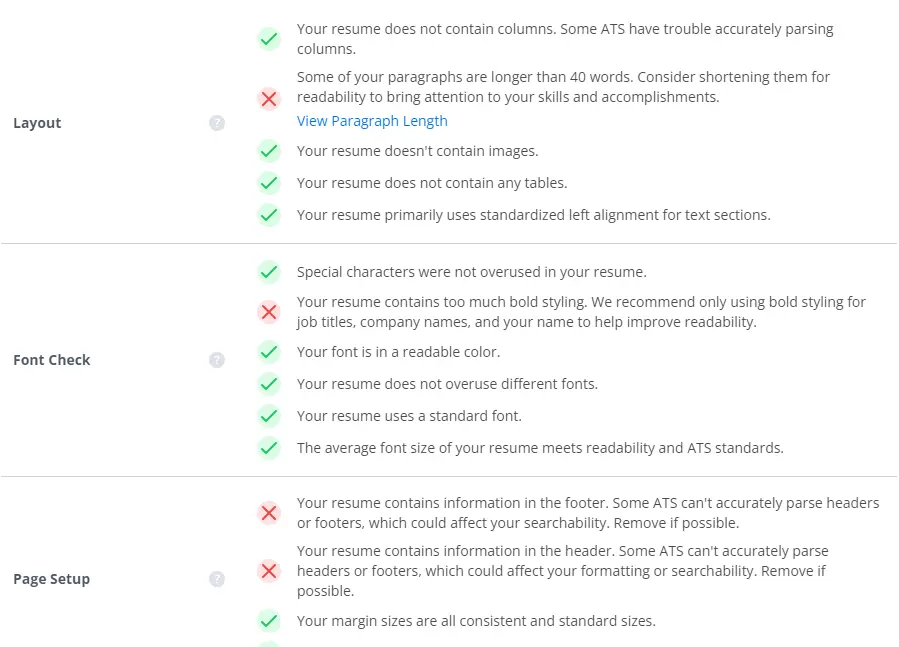
Try the scanner for free to confirm that your resume is ready to submit. Start by uploading or pasting in your resume along with a target job description then press scan. It will generate an actionable report you can use to improve your documents readability for the ATS.
If your current document is too complex, use our tool to convert your resume to ATS format.
FAQs
Jobscan’s resume scanner can ensure your resume is ATS-friendly by flagging formatting errors. By fixing these errors, you can feel confident your resume will be readable for the ATS.
Yes, strictly avoid them. Most ATS software cannot “read” information contained within images, graphics, skill bars, or charts. Any text inside these elements will be scrambled or ignored, resulting in recruiters not finding your resume in their ATS searches.
An ATS-friendly resume is formatted in a way that makes it easy for an ATS to read and understand it. It also includes keywords and phrases that are relevant to the specific job opening. If you write your resume with ATS software in mind, it will have a much better chance of making it into the hands of a hiring manager.
Proceed with caution. Many resume builders focus on aesthetics over function and may use code, tables, or columns that confuse an ATS. Only use builders that explicitly offer ATS-compliant templates like Jobscan.
Further reading: